

Best property management software in Canada: nine things to check before you switch
The three kinds of software on the market, the nine checks that matter to Canadian operators, and what switching systems really involves.
Most operators start looking for new software after a bad month-end, an acquisition or a new hire who can't find anything. By then the question isn't whether to switch. It's how to avoid switching twice.
There isn't one right system for every portfolio. This guide covers the three kinds of software on the market, the nine checks that matter for Canadian operators, and what switching actually involves.
Is there a best property management software in Canada?
It depends on your portfolio. For managers with a few hundred to a thousand doors who are outgrowing spreadsheets, the deciding factor is usually whether accounting and operations are one connected system or two tools you keep in sync. Then check Canadian tax, Québec and bilingual needs, and what onboarding looks like.
What types of property management software exist?
Most options fall into three groups: heavyweight platforms with dependable accounting but painful day-to-day operations, modern point solutions that are easy to use but leave accounting disconnected, and connected platforms with an accounting engine at the core. These are patterns, not product reviews.
| Type | Where it is strong | Where it struggles | Typical fit |
|---|---|---|---|
| Heavyweight platforms | Dependable accounting | Day-to-day operations are painful and reports are hard to read | Operators who need depth and can absorb the complexity |
| Point solutions | Easy to use | Accounting is disconnected, so you stitch tools together | Small portfolios, or a single job such as leasing |
| Connected, accounting-first platforms | Accounting and operations in one system | Breadth varies, so check every module you need | Growing managers who want to scale without growing the back office at the same rate |
What should Canadian operators look for?
Nine things: accounting depth, payments that reconcile, Canadian sales tax, Québec requirements, bilingual support, your property types, onboarding, predictable pricing and support after go-live.
- Accounting depth: a real general ledger, with receivables by lease and separate books per owner. Our accounting software checklist covers it in full.
- Payments that reconcile: PAD and Interac e-Transfer, with payments matched to leases automatically.
- Canadian sales tax: GST, HST, PST or QST on commercial leases and expenses.
- Québec requirements: RL-31 slips and the TAL's rent increase rules, if you operate in Québec.
- Bilingual support: English and French for leases, tenant communications and your team.
- Your property types: residential, commercial, student or mixed-use. Ask about each one you manage.
- Onboarding and migration: who moves your data, and who signs it off?
- Predictable pricing: the all-in cost, subscription plus payment and usage fees.
- Support after go-live: a team that stays with you, not only a help centre.
How hard is it to switch property management software?
It's a project, not a weekend, but it follows a predictable path: kickoff, approval for online payments, a business process review, data migration, training and a monitored first live month. Go-live depends on your portfolio size, your data and your notice periods.
What onboarding looks like at Kompas
Use our onboarding process as a benchmark when you compare vendors.
- Kickoff: you agree the timeline and who attends each step.
- Approval for online payments: Kompas manages the application. You supply the documents, so this starts early.
- Business process review: a conversation about how you operate today, so training and migration fit your team.
- Data migration: you choose how much of the data work you do. The data is verified, validated, tested in a separate environment and imported only after your formal approval.
- Training: two sessions of two to three hours each, first lease management and accounting, then leasing, renewals, maintenance and the tenant portal.
- Go-live: planned for the first of the month, with Kompas monitoring the first run.
- The first six weeks: closer support, with check-ins at three and six weeks, before you move to regular support.
- Typical go-live
- Under 30 days
- Portfolios under 100 units
- Typical go-live
- 4–6 weeks
- Around 500 units
- Team training
- 2 sessions
- Two to three hours each
“Most operators switch because they outgrew the last tool. Pick the one you won't have to leave.”
What questions should you ask every vendor?
Ask every vendor the same six questions so the answers are comparable.
- Who owns data migration, and what do I sign off before import?
- How are incoming payments matched to leases?
- Can you show a month-end close from start to a locked period?
- What do I pay in total: subscription, payment fees and usage fees?
- Which of my property types and provinces are fully supported today?
- What does support look like in the first month after go-live?
What does Kompas offer?
Kompas is accounting-first property management software for Canadian real estate operators. It brings accounting, payments, leasing, maintenance and a tenant portal into one platform, so the work scales as fast as the portfolio does.
- Accounting: a general ledger with receivables by lease, books per owner, bank reconciliation with locked periods and exportable reports.
- Payments: PAD and Interac e-Transfer with automatic reconciliation, and vendor payments by EFT or cheque.
- Leasing: from first inquiry to signed lease, with renewals tracked and leases in English and French, including the Québec residential lease.
- Maintenance: service tickets, turnover checklists and inspections, with costs flowing to payables.
- Tenant portal: tenants pay rent, view their lease and transaction history and submit service tickets.
- Built for Canada: English and French, RL-31 slips, the Québec residential lease, bulk rent increases, and GST, HST, PST and QST handling.
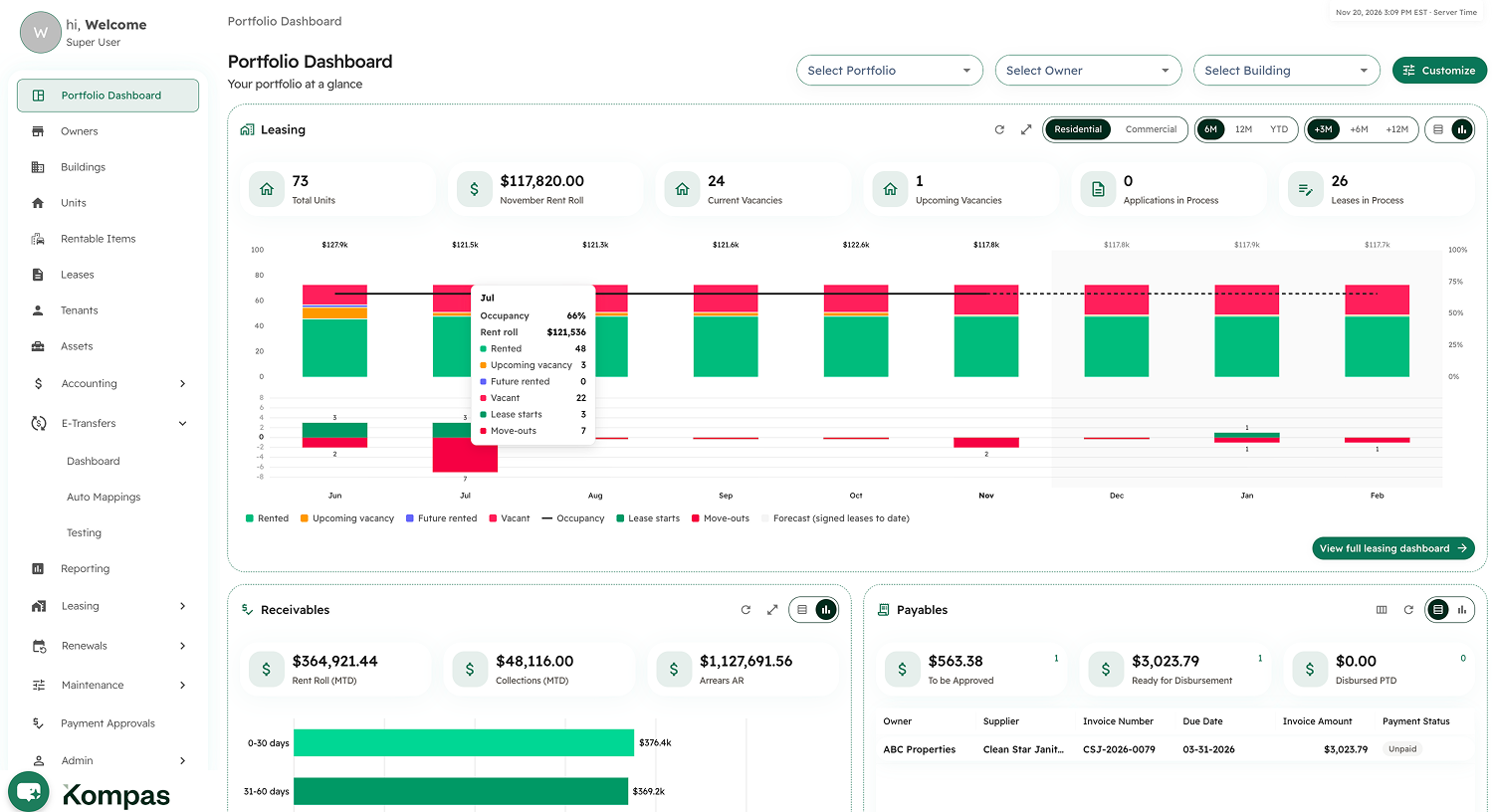
Kompas is built for residential, commercial, student and mixed-use portfolios.
Walk through your own portfolio setup with the Kompas team.
See it liveFrequently asked questions
Most vendors price per unit per month, with payment or usage fees on top. Ask for the all-in cost for your portfolio. Kompas prices per unit, not per seat, with every feature on every plan, and publishes its plans and per-transaction fees on its pricing page.
Look for French in leases, tenant communications and the interface. Kompas supports English and French, including leases and tenant invitations in both languages.
It can, if the software supports each. Commercial leases need operating cost recoveries, sales tax and year-end true-ups that residential leases don't. Kompas supports both, along with student housing and mixed-use buildings.
It depends on your portfolio size, the state of your data and your notice period with the old system. With Kompas, portfolios under 100 units are typically live in under 30 days, and around 500 units in four to six weeks.
Plan for some overlap around go-live so you can check the first month against your old records. Ask each vendor how migration and your notice periods line up.
Newsletter
GET THE NEXT GUIDE IN YOUR INBOX
Practical guides for property managers on accounting, payments and leasing. One email a month.